Google Business Profile gives local businesses a powerful way to appear in Google Search and Google Maps when nearby customers are looking for products, services, and timely updates. One of the most underused features inside the profile is the ability to publish event posts. When used well, event posts can highlight workshops, open houses, seasonal sales, community gatherings, product launches, and other time-sensitive happenings that may persuade a searcher to visit, call, or book.
If you want more visibility for a specific date, time, or promotion, learning how to post an event to your Google Business Profile is worth the effort. Event posts help you keep your listing fresh, communicate urgency, and give people a reason to act now instead of later. Below, you will learn exactly how event posts work, how to create them, what to include, common mistakes to avoid, and how to turn this simple feature into a reliable local marketing asset.
Why event posts matter for local visibility and customer action
Many businesses treat their Google Business Profile as a static listing, but Google rewards profiles that stay active and useful. Posts are one of the clearest ways to signal that your business is current, responsive, and engaged with customers. An event post is especially valuable because it combines freshness with a deadline. That combination can improve attention and motivate action.
When someone sees your business on Google, they are often making a fast decision. They may be comparing nearby options, checking your hours, reading reviews, or deciding whether your business is worth a visit. If your profile includes a clear upcoming event, that extra information can help you stand out. It can also answer practical questions before the person even clicks through to your website.
Event posts are useful for many business types, including:
- Restaurants promoting live music nights, tasting menus, or holiday brunches
- Retail stores announcing launch parties, sidewalk sales, or seasonal events
- Gyms and studios sharing free trial classes, workshops, or member events
- Salons and spas promoting special beauty events or limited-time packages
- Medical and dental offices hosting educational sessions or screening events
- Real estate offices advertising open houses or first-time buyer seminars
- Museums, attractions, and community organizations publicizing public programs
Google has long emphasized the importance of providing accurate and helpful local business information. If you want to understand the broader role of local listings in search, Google’s local business information guidance offers useful background.
What an event post is inside Google Business Profile
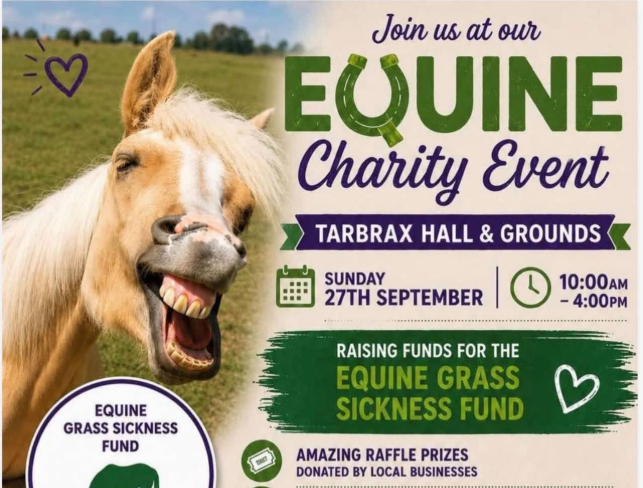
An event post is a type of update you can publish directly within your Google Business Profile. It is designed for happenings with a start date and time, and in many cases an end date and time as well. It usually includes a title, date details, a description, and optionally a call to action button that leads to a relevant page on your website.
Unlike a general update, an event post is built around a scheduled occurrence. That structure makes it ideal for anything happening on a specific day or across a limited date range. The event format also helps users quickly understand when the event takes place, which is critical for attendance and conversions.
Depending on how Google displays your profile, event posts may appear in your business listing on Search or Maps. Display can vary by device, query, and interface changes over time, so it is best to think of posts as a helpful enhancement rather than a guaranteed placement. Even so, they remain a valuable tool because they contribute to a richer profile experience and help communicate current activity.
Before you create a post, prepare the right information
The fastest way to create a strong event post is to gather your details before you open your profile dashboard. This keeps your message clear and reduces the chances of missing important information.
Core details to prepare
- Event name
- Start date
- Start time
- End date, if applicable
- End time, if applicable
- Short event description
- Primary action you want people to take
- Landing page URL for tickets, registration, booking, or event details
- Image that represents the event
Helpful supporting details
- Whether the event is free or paid
- Age restrictions or eligibility requirements
- Parking or access notes
- Featured speaker, performer, or host
- Limited availability or reservation deadlines
- Special offer tied to the event
It also helps to confirm that your business hours, phone number, website, and category are accurate in your profile. A great event post can lose value if a customer clicks through and finds inconsistent information.
Step by step: how to post an event to your Google Business Profile
The exact interface can change as Google updates the product, but the general process remains similar. You can usually create a post through Google Search while signed in to the account that manages your business profile.
1. Sign in to the Google account that manages the profile
Use the Google account associated with your business. Search for your business name on Google, or search for “my business” while logged in. This typically brings up the management panel for your profile.
2. Open the posting feature
Look for an option such as “Add update,” “Promote,” or “Add event.” Google may place this in different areas depending on the current interface. Select the event post type if prompted to choose among update types.
3. Enter the event title
Your title should be specific, concise, and useful. Avoid vague names like “Special Event” or “Join Us.” Instead, use titles that tell people what is happening.
Examples:
- Free Back to School Dental Q and A Night
- Saturday Wine Tasting with Local Vineyards
- Holiday Open House and Gift Wrapping Event
- Beginner Yoga Workshop for New Members
4. Add the start and end details
Enter the date and time carefully. Accuracy matters. If your event spans multiple days, use the correct range. If it is a one-day event, make sure the start and end times are easy to understand and match your website details.
For recurring events, do not assume one post will cover every occurrence forever. It is often better to create separate event posts for key dates or to promote the next upcoming session with a clear registration page.
5. Write the description
This is where you explain why the event matters and what attendees can expect. Focus on value, clarity, and urgency. Mention what makes the event worth attending, who it is for, and what action the reader should take next.
A strong event description often includes:
- The main benefit or attraction
- Who the event is designed for
- Any limited-time or limited-space element
- A soft call to action such as reserve your spot or learn more
6. Add a button if available
Google often lets you add a call to action button such as Learn more, Book, Sign up, or Buy. Choose the one that most closely matches your goal. Then link it to the most relevant page, not just your website homepage. A dedicated event page usually performs better than a generic page because it reduces friction.
7. Upload an image
Use a clean, high-quality image that visually supports the event. Avoid cluttered graphics with tiny text that becomes unreadable on mobile devices. If you use a flyer design, make sure the most important visual element is still clear when cropped.
8. Review and publish
Double-check spelling, dates, times, and the destination URL. Once everything looks right, publish the post. After it goes live, view your profile on both mobile and desktop if possible to confirm how it appears.
How to write event posts that actually drive clicks and visits
Publishing a post is simple. Publishing one that gets attention is a different skill. The best event posts are focused, relevant, and easy to scan.
Lead with the outcome
People care most about what they gain. Instead of filling the description with background details first, start with the reason someone should attend. That might be learning a skill, getting a deal, meeting an expert, enjoying entertainment, or solving a problem.
Example:

Join our free skincare consultation event to get personalized product recommendations before the holiday season.
Be specific about who should attend
Specificity improves relevance. If the event is for first-time homebuyers, new patients, parents of young children, or advanced runners, say so. That helps the right audience self-identify quickly.
Create urgency without sounding spammy
Urgency works best when it is real. Mention limited seating, one-day-only offers, early registration deadlines, or seasonal timing if those details are true. Avoid overhyped language that feels exaggerated.
Keep the copy readable
Short sentences and clear wording work best. Mobile users often skim, so make the key details easy to grasp in seconds.
Match the post to the landing page
If your post promises registration, the linked page should make registration easy. If it promises event details, the page should provide those details immediately. Consistency improves trust and conversion rates.
Best practices for images, branding, and formatting
Visual quality can influence whether someone stops to look at your event post. A weak image can make even a strong event seem less appealing, while a polished image can increase attention and credibility.
Use clear, relevant imagery
The image should instantly relate to the event. A cooking class should show food, a chef, or the class setting. A fitness workshop should show the studio or the type of activity involved. Generic stock images are acceptable in some cases, but original images are usually stronger.
Avoid text-heavy graphics
Google surfaces content in different layouts and sizes, especially on mobile. If your image depends on small text, much of it may be cut off or unreadable. Keep any text minimal and large enough to survive cropping.
Stay consistent with your brand
Use your brand colors, style, and tone where appropriate. Consistency helps people recognize your business across Google, your website, email, and social channels.
Make accessibility a consideration
Clear visuals, readable text, and straightforward language help a wider audience engage with your content. For broader accessibility principles in digital communications, the W3C introduction to web accessibility is a useful reference.
Examples of effective event post angles by business type
Different businesses should frame events differently based on what their customers care about most. Here are practical examples you can adapt.
Restaurant
Title: Friday Seafood Night with Live Jazz
Description: Enjoy a special seafood menu, live jazz from 7 PM to 9 PM, and limited patio seating. Reserve your table early for the best availability.
Dental practice
Title: Free Invisalign Consultation Day
Description: Meet with our team for a complimentary consultation, digital scan, and personalized treatment overview. Appointments are limited.
Boutique retail store
Title: Fall Fashion Preview and Styling Event
Description: Be the first to shop our new fall arrivals and get one-on-one styling advice. Attendees receive an in-store event-only offer.
Fitness studio
Title: Beginner Pilates Workshop
Description: New to Pilates? This small-group workshop covers form, breathing, and core basics in a welcoming setting. Reserve your mat in advance.
Real estate office
Title: First-Time Homebuyer Seminar
Description: Learn the buying process, financing basics, and common mistakes to avoid. Ideal for local buyers planning to purchase within the next year.
Common mistakes to avoid
Even well-meaning businesses often weaken their event posts with preventable errors. Avoiding these issues can improve both user experience and results.
Using a vague title
If the title does not clearly say what the event is, many users will ignore it. Clarity beats cleverness.
Leaving out the benefit
A post that only says what is happening, without explaining why it matters, is less persuasive. Tell people what they get from attending.
Sending traffic to the wrong page
Do not link to a generic homepage when a more specific page exists. Every extra click reduces the chance of conversion.
Publishing too late
If you post an event only a few hours before it starts, many customers will not have enough time to respond. Publish early enough to build awareness, then support the event with other channels.
Forgetting mobile users
Most local search activity happens on mobile devices. If your image, copy, or landing page is difficult to use on a phone, performance will suffer.
Not updating canceled or changed events
If plans change, update the post and your website promptly. Inaccurate event information can damage trust and create negative customer experiences.
Timing strategy: when to publish and how often to post
The ideal timing depends on the type of event and how much planning customers need. A free in-store tasting may only need a few days of lead time, while a seminar or ticketed event may need several weeks.
General timing guidelines
- Publish simple local events 3 to 7 days in advance
- Publish workshops, classes, or ticketed events 2 to 4 weeks in advance
- Publish major seasonal events 3 to 6 weeks in advance
If the event is important, support it with a coordinated schedule:
- Create the Google event post first
- Update your website event page
- Send an email announcement
- Share on social media
- Remind customers again as the date approaches
For recurring events, build a repeatable workflow. Use a template for titles, descriptions, and image dimensions so your team can publish quickly without sacrificing quality.
How event posts fit into your broader Google Business Profile strategy
Event posts work best when they are part of a complete, well-maintained profile. They should support, not replace, the other elements that influence local performance.
Keep your core business information accurate
Your name, address, phone number, hours, and website should be correct at all times. A customer drawn in by an event post may still leave if basic details are wrong.
Use photos consistently
Fresh photos of your business, staff, products, and space make your profile more trustworthy and appealing. Event posts perform better when the rest of the profile already looks active and credible.
Manage reviews actively
Reviews often influence whether users act on your event post. If your listing shows recent, positive, well-managed reviews, people are more likely to trust your event and your business.
Answer questions and monitor engagement
If customers call, message, or ask questions related to the event, respond quickly. Fast responses can turn interest into attendance.
How to measure whether your event posts are working
Like any marketing effort, event posting should be evaluated. While Google Business Profile insights can change over time, you can still track performance through a combination of profile metrics, website analytics, and real-world outcomes.
Metrics to watch
- Website clicks from your profile
- Calls after the post goes live
- Direction requests
- Registrations or bookings on the linked landing page
- In-store attendance or redemptions tied to the event
Use trackable URLs when possible
If you use analytics tools, consider adding campaign parameters to the event button URL so you can identify traffic from the profile more clearly. This is especially helpful if you run multiple promotions at once.
Compare post types and themes
Over time, look for patterns. Do educational events outperform promotional ones? Do posts with people in the image get more clicks than product-only images? Does a “Book” button convert better than “Learn more”? Small tests can reveal what your audience responds to most.
What to do if your event post is rejected or not appearing as expected
Sometimes a post may not publish, may be limited, or may not appear where you expected. This can happen for several reasons, including policy issues, formatting problems, or normal variation in how Google displays profile content.
Check for policy compliance
Make sure your content does not include prohibited material, misleading claims, or unnecessary promotional gimmicks. Avoid excessive capitalization, repetitive punctuation, or language that could trigger moderation concerns.